

Attendance tracking was straightforward when everyone was in the same room at the same time. Hybrid and online delivery changed that. Instructors now manage students across multiple locations simultaneously, often with different tools for each format, producing fragmented records that are difficult to consolidate and even harder to use for compliance or reporting.
The problem is not a lack of tools. It is that most attendance methods were designed for one context and stretched awkwardly into others. This guide covers why hybrid and online courses create specific tracking challenges, what a workable solution needs to do, and how universities are handling it in practice.
Why hybrid and online courses create attendance tracking problems
Most attendance methods assume a single, shared physical space. Bluetooth proximity works in a room. Sign-in sheets require students to be present to sign them. Even QR codes, despite their limitations, depend on a student being close enough to scan a screen.
Hybrid delivery breaks this assumption entirely. In a hybrid session, one group of students is in the lecture hall and another is joining remotely. An instructor using Bluetooth check-in captures the in-person students accurately but has no mechanism for the remote group. An instructor using a Zoom attendance report captures login data for remote students but nothing meaningful for those who are physically present. The result is two separate, incomplete datasets that need to be manually reconciled after every session.
Online delivery removes the shared physical space altogether, which rules out every proximity-based method by default. Instructors fall back on LMS login data, meeting platform reports, or manual confirmation processes, none of which are designed to verify that a student was genuinely present and engaged during a live session.
The administrative overhead compounds quickly across a semester. For instructors running multiple hybrid or online courses, the time spent managing attendance records across formats often rivals the time spent on actual teaching preparation.
What counts as attendance in a hybrid or online course?
This is a question institutions handle inconsistently, and it is worth being direct about it.
Logging into the LMS is not attendance. Downloading lecture slides is not attendance. Even joining a Zoom session is not straightforward evidence of presence, a student can join, mute their audio, disable their camera, and leave within two minutes while the session report records them as present for the full duration.
Verified live attendance means a student was present and connected during the live session, at the time it was delivered. This matters for two reasons. First, it is the standard most attendance policies are built around. Second, it is the standard that compliance processes typically require. A Zoom login timestamp is not the same as an attendance record in the eyes of a compliance audit.
The distinction between passive engagement tracking and verified live attendance is one that technology needs to handle explicitly, because most tools blur it by default.
Common approaches and where they fall short
LMS-native attendance tools
Canvas, Moodle, Blackboard, and similar platforms offer attendance features, but they are generally designed for tracking participation in online activities (assignment submissions, discussion posts, quiz completions) rather than live session presence. They work reasonably well as engagement proxies but do not verify that a student was present during a specific live class. For a detailed look at what LMS platforms offer, see How to track attendance in your learning management system.
Video platform meeting reports
Zoom and Microsoft Teams generate attendance reports that show who joined a session and for how long. These are useful as a starting point but have real limitations. They do not distinguish between a student who was genuinely present for the full session and one who joined briefly and then left. They also cover only the remote students in a hybrid session, leaving in-person attendance unaddressed.
QR codes for in-person students only
Some instructors use QR codes for in-person students and a separate confirmation method for online attendees. This produces two separate datasets that need to be reconciled manually, and the QR code vulnerability to sharing means even the in-person data may not be reliable. For a full comparison of QR codes against other methods, see Bluetooth attendance tracking for universities: the complete guide.
Manual spreadsheets and email confirmation
Instructors who have given up on automated tools often manage hybrid attendance through a combination of spreadsheets, email check-ins, or self-reporting. This works at a very small scale but becomes unmanageable across multiple courses and produces records that are time-consuming to compile and difficult to audit.

What a reliable hybrid attendance system actually needs to do
The criteria for a good hybrid attendance solution are more demanding than for a straightforward in-person tool. It needs to:
Handle in-person and remote students in the same session
Not two separate processes that produce two separate records, but a single check-in mechanism that captures both groups simultaneously and stores them together.
Verify presence for both groups
In-person verification should confirm the student is physically in the room. Remote verification should confirm the student was connected during the live session, not just at some point during the day.
Produce a single unified record
A session should produce one exportable attendance list, not an in-person list and a separate online list that needs to be manually merged before they can be used.
Require no different setup per format
Instructors should not need to switch tools, reconfigure settings, or run parallel processes depending on whether a given session is in-person, hybrid, or fully online. The same workflow should cover all three.
How Attendance Radar handles hybrid sessions
In a hybrid session, Attendance Radar uses two mechanisms in parallel (one for each group) and combines them into a single session record.
In-person students check in via Bluetooth
The instructor opens the app and emits a Bluetooth Low Energy signal. Students in the room tap once to mark themselves present. Physical proximity is verified automatically.
Remote students use the manual session code
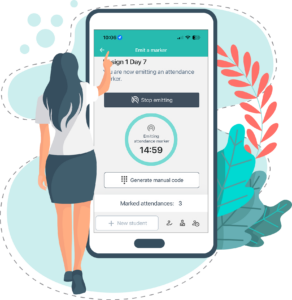
The instructor generates a randomly generated six-digit code and shares it verbally during the live session, spoken aloud in the room and read out on the video call. Students joining remotely enter the code in the app to mark their attendance.
Both check-ins land in the same session record. There is no reconciliation step, no second spreadsheet, no post-session merging. The export contains the full attendance list for the session regardless of how individual students attended.
The manual code is more resistant to casual sharing than a QR code, it is not a displayable image that can be screenshotted from a slide and forwarded en masse. That said, a student who is present on the call can still share the code with an absent friend over a message. It is not a fraud-proof mechanism in the way Bluetooth proximity verification is. What it does is raise the barrier meaningfully: sharing requires active coordination during a live session, which most students will not bother with. For institutions where attendance integrity is a higher priority, Bluetooth check-in for in-person sessions remains the more reliable option.
How Attendance Radar works in fully online courses
For sessions with no in-person component, the process relies entirely on the manual code. There is no Bluetooth signal to emit and no proximity verification needed.
The instructor starts the session in the app and generates the code. They share it verbally at the start of the live class. Students enter the code in the Attendance Radar app to mark themselves present.
Because the code is session-specific and delivered in real time, it functions as a reasonable proxy for live presence. It is worth being transparent about the limitation: a student who is on the call can share the code with an absent friend. This makes the manual code less secure than Bluetooth proximity verification, which requires physical presence in the room. For fully online sessions where Bluetooth is not an option, the code still represents a meaningful improvement over LMS login data or meeting platform reports, both of which do not verify active presence at all.
Because the code is session-specific and delivered in real time, it functions as a proxy for live presence. A student who was not on the call when the code was shared has no straightforward way to obtain it. The record that results reflects who was present during the actual session, not just who logged into the platform at some point.
Records are stored automatically and exportable to Excel for sharing with administrators or compliance teams. University plans integrate directly with LMS and student information systems, so data does not need to be transferred manually. See Attendance tracking software for universities: how to choose the right system for more on what to look for when evaluating tools for different delivery formats.
Frequently asked questions
How do you take attendance in a hybrid class? The most reliable approach uses two complementary methods in the same session (one for students in the room and one for students joining remotely) and combines the results into a single record. Attendance Radar does this using Bluetooth check-in for in-person students and a verbal session code for remote attendees, with both captured in the same session export.
Can you track attendance for online university courses? Yes, though the mechanism is different from in-person tracking. Without physical proximity to verify, the most effective approach is a time-sensitive session code delivered verbally during the live class. This confirms the student was present when the session was running rather than simply recording a platform login.
How do you prevent students from sharing attendance codes in online classes? No code-based method is completely fraud-proof; a student on the call can share the code with an absent friend. What a verbally delivered, session-specific code does is raise the barrier compared to a QR code: it is not a static image that can be mass-forwarded before a slide changes, and it requires active effort from the student sharing it. For online sessions, this is a practical and reasonable approach. For in-person sessions where security is a higher priority, Bluetooth proximity verification is the more reliable option as it requires the student’s device to be physically in the room.
Can in-person and online attendance records be combined in one report? With the right tool, yes. Attendance Radar captures both in-person Bluetooth check-ins and remote code check-ins in the same session record, producing a single exportable attendance list without any manual reconciliation.
The bottom line
Hybrid and online delivery did not just change where students attend, it fragmented the attendance tracking process in ways that most tools were not built to handle. LMS reports, meeting platform logs, and QR codes each cover part of the picture but leave gaps that require manual work to fill.
A system that handles in-person, hybrid, and online sessions within the same workflow, and produces a single unified record for each session, removes that overhead entirely.
Attendance Radar is free to download. Whether your course is in a lecture hall, split across formats, or fully online, the workflow is the same.
Download Attendance Radar for free today.